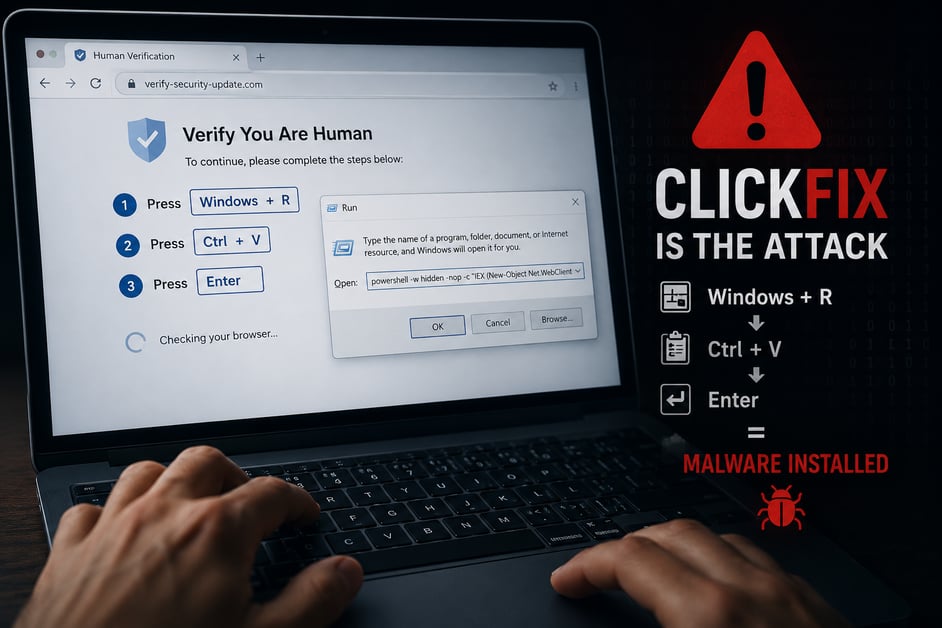
 If a website asks you to press Windows + R, you're likely looking at a ClickFix attack.
If a Website Asks You to Press Windows + R, That IS the Attack
A Quick Guide to Recognizing "ClickFix" Scams
Cybercriminals are constantly changing their tactics, but one of the fastest-growing scams we're seeing is called ClickFix.
Unlike traditional malware that exploits software vulnerabilities, ClickFix tricks you into unknowingly installing malware yourself. The attack is disguised as a legitimate verification step or a solution to a fake computer problem.
It has quickly become one of the most common ways attackers gain access to small business networks.
What Is ClickFix?
ClickFix is a social engineering attack that convinces users to paste a malicious command into Windows.
A malicious webpage may pretend to be:
- Microsoft
- Cloudflare
- Google Chrome
- A CAPTCHA verification page
- Another familiar website or security service
Instead of asking you to click a button, it instructs you to perform keyboard shortcuts that secretly execute malware.
What It Looks Like
The page typically instructs you to perform these three steps:
Step 1
Press Windows + R
Step 2
Press Ctrl + V
Step 3
Press Enter
To make the request sound legitimate, the page may claim you need to:
- Verify you're human
- Fix your browser
- Repair Windows to continue
- Complete a CAPTCHA
- Reload your DNS cache
If a website ever asks you to press Windows + R, you are looking at an attack. Full stop.
What Actually Happens
Here's what's really occurring behind the scenes.
Windows + R
Opens the Windows Run dialog, which can launch programs and execute commands.
Ctrl + V
Pastes a malicious command that the webpage secretly copied to your clipboard. It often begins with commands such as:
powershellmshta
Enter
Executes the command, downloading malware or remote-access software onto your computer.
Within seconds, an attacker may be able to:
- Steal saved passwords
- Read company email
- Access business files
- Install additional malware
- Log into company systems as you
What You Should Do Instead
If you encounter a page like this:
✅ Stop immediately.
Do not press any of the requested keyboard shortcuts.
✅ Close the browser tab.
If the page prevents you from closing it, press Ctrl + Shift + Esc to open Task Manager and force-close your browser.
✅ Report it immediately.
Notify your IT department or managed IT provider.
If possible, take a photo of the screen with your phone before closing it. This helps identify and block the threat.
✅ Never "test it."
If you're wondering whether the page might be legitimate...
It isn't.
Rules of Thumb
| Legitimate Website | Potential Attack |
|---|---|
| May ask you to click a checkbox or select images | Asks you to press keyboard shortcuts |
| Microsoft support works through Windows Settings or official support tools | A webpage tells you to open the Windows Run dialog |
| CAPTCHAs ask you to click images or "I'm not a robot" | A CAPTCHA tells you to paste commands |
| Error messages appear inside the application that's having the problem | A random webpage gives you keyboard instructions |
Why We're Sharing This
Our team recently responded to a real ClickFix incident involving one of our clients.
The employee wasn't careless.
The page looked professional, created a sense of urgency, and closely resembled websites people use every day.
That's exactly why these attacks are successful.
The best defense isn't better eyesight—it's knowing this scam exists before you encounter it.
Final Takeaway
Remember this simple rule:
No legitimate website will ever ask you to press Windows + R, paste a command, and press Enter.
If you ever see instructions like this:
- Close the tab.
- Don't follow the steps.
- Contact your IT team.
There is no downside to reporting a suspicious webpage—but there can be serious consequences if you don't.
Stay One Step Ahead of the Next Scam
Cybercriminals are constantly changing their tactics, and attacks like ClickFix are just one example of how quickly new threats emerge.
That's why we publish our Cybersecurity Tip of the Week—a free weekly email designed to help business owners and employees recognize today's most common scams before they become tomorrow's security incident.
Each tip takes less than 30 seconds to read and provides practical, real-world advice you can put to use immediately.
Click the button below to subscribe and receive your free Cybersecurity Tip of the Week every Wednesday.